Alerts
Subscribe to after-close notes
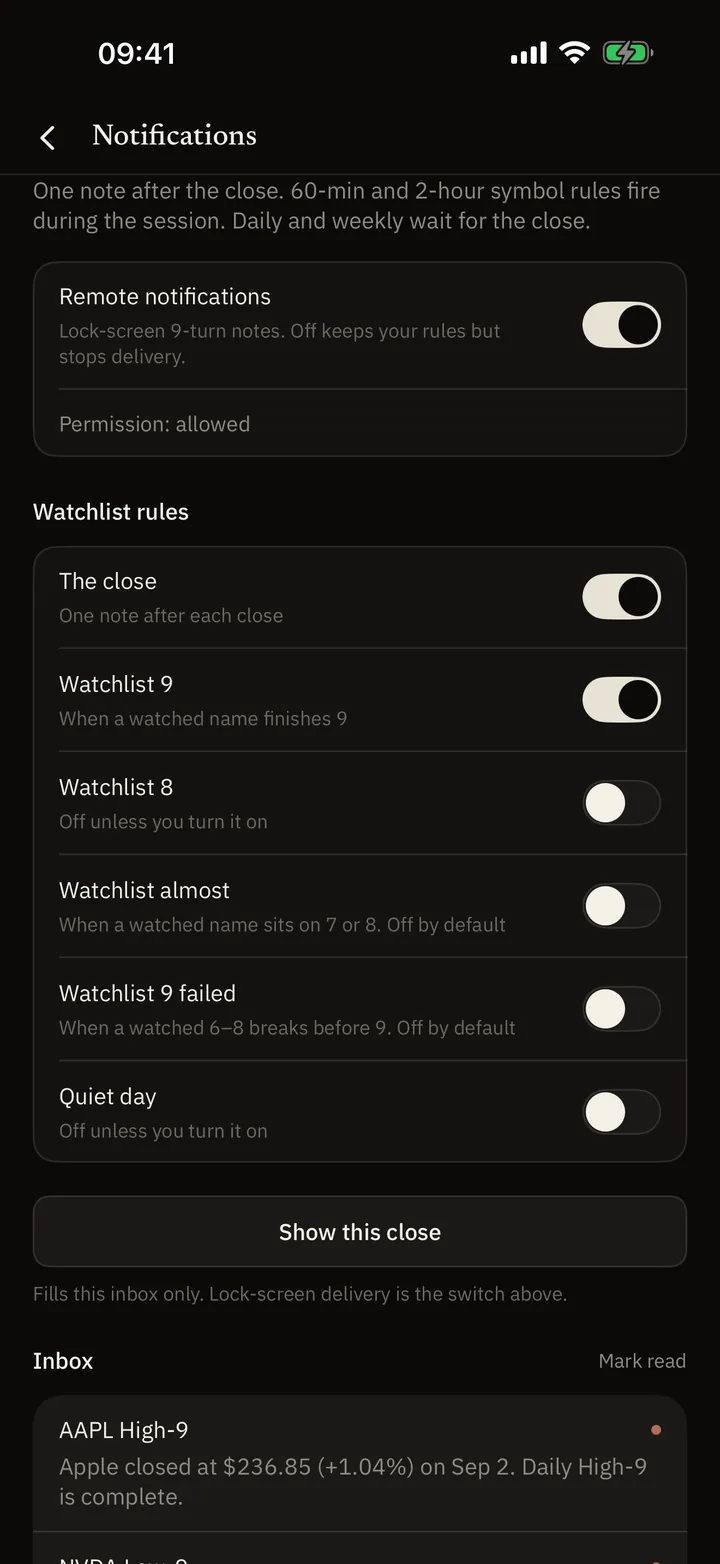
You do not have to sit the close. Ask for one note after the session — not a stream of shouts. That is Pro. You pick a master switch, a few watchlist categories, and optional rules on a name. Saving a rule is not the same as a note on the lock screen.
What this is for you
- You do not have to sit the close: The close-summary switch starts on. When that note is sent, it counts finished low-9s, high-9s, and 13s. An incomplete scan can hold the summary back.
- Watch the list you already keep: Watchlist 9 also starts on. Count 8, Almost, a failed 9, and a quiet day stay off until you turn them on. If count 8 is on, Almost no longer includes 8. A quiet day is no finished daily low-9 or high-9.
- Rules stay on one timeframe: A weekly low-9 rule does not rewrite the daily rule on the same name.
- Fewer duplicate notes: Events in a short window can merge into one digest. The inbox keeps recent notes; it is not a full archive.
Open Inbox
From Today’s bell, or from Me. Allow system notifications when asked. If you denied them earlier, open iOS Settings.
Turn the master switch on
You need Pro. A switch on this phone is not enough until the server also sees a live subscription and a working push registration.
Choose what on your list should wake you
Close summary and watchlist 9 start on. Leave the rest off unless you want them: count 8, Almost (7, or 8 only while count 8 is off), a 6–8 that breaks before 9, or a quiet day.
On a name, keep the rule on this timeframe
Almost, 8, failed 9, low-9, high-9, 13 — only for the timeframe you are looking at. 60- and 120-minute: after that bar closes, in session. Daily and weekly: after that close.
Read whether it can actually arrive
The name’s page says if the rule is only saved, waiting on permission, or ready. If a note was missed, pull Inbox.
Turn off what you no longer want
Clear this timeframe, flip a category off, or leave Pro. New notes stop. A note already handed to Apple’s push cannot be pulled back.
When you should expect a note
Daily and weekly wait for that market’s cash close. An early-close day uses that day’s shorter session. 60- and 120-minute rules wait until that bar has closed in the session.
Quotes can lag. If Pro has expired, permission is off, or push was never registered, the lock screen stays quiet even if you saved a rule.
FAQ
I saved a rule. Why no note?
Saved is not delivered. You still need Pro, system permission, a working push registration, and a scan after that bar actually closed. Wait for the next close or in-session bar, then pull Inbox. Force-quitting the app has not been verified as a fix.
Why one note for several names?
Same device, market, and mode can merge in a short window so the lock screen is not a stack of shouts. The body lists a few names and says when there are more.
Does Watchlist 8 fire all day?
No. It is off unless you turn it on. Daily still waits for the close. 60- and 120-minute rules on a symbol page fire when that bar closes.
Will turning a name off unsend a note already on the way?
No. Changing the list drops notes that have not gone out yet. A note already handed to Apple’s push cannot be pulled back.
Notes after the close
If a note did not arrive, say which market and timeframe. Questions: support@nineradar.com.